
A weekly calendar review: commitments, time blocks and shared responsibilities
Use a short review to identify what is already fixed and what still needs a decision. The routine below is a suggested workflow, not a promise that every week can be organised in ten minutes. This guide is published by Arte Soft, the developer of Cloud Calendars.
What most people assume
Adding enough time blocks automatically makes a realistic plan and tells everyone what they are responsible for.
Start with the right dates and calendars
Open the intended week and select the calendars relevant to the plan. Read the date range, not just the weekday labels. A personal view with work hidden can make an unavailable afternoon look clear; a combined view does not automatically share those commitments with anyone else.
Choose one ordinary appointment from each important calendar and check that it appears on the expected date. If a source is missing or stale, resolve that comparison before building the week around an apparent gap. Do not remove an account or duplicate a meeting just to make the overview look complete.
Separate fixed commitments from proposed blocks
Keep an agreed lesson, client appointment or booked journey at its real time. A block for writing, preparation or errands is a proposal you control; it is not the same as an invitation someone else has accepted. Label a provisional block clearly when another decision is still needed.
For example, a report due on Friday may need preparation earlier in the week. Estimate the work from the actual task and choose a block that fits around existing commitments. There is no universal rule that exactly three discretionary items will fit everyone’s week.
If Tuesday’s 45-minute preparation block ends with half a report still to write, estimate the remaining work and choose another realistic opening around agreed appointments. Keep Friday’s 17:00 deadline separate: moving the preparation block does not move the deadline. A calendar block records planned time, so check the task itself before calling it finished.
Include the transitions that use the gaps
Check location and actual start and end times. Travel, setup and a handoff can consume a gap between two appointments even when the hour grid shows empty space. Use a suitable route estimate for the intended time, and keep uncertainty or venue requirements in the plan.
For an afternoon workshop, distinguish the public start from arrival and preparation. If separate entries help, label them so a helper does not confuse a departure block with the workshop itself. This planning convention is not a claim that a personal block automatically reserves time in every connected provider’s availability system.
Agree responsibilities, not just attendance
A family activity on the calendar may still lack a person responsible for collection. Agree who will act, when and where; record the decision in the intended shared calendar and obtain a direct confirmation. A name in an event title is not an automatic assignment.
Choose the audience deliberately. A private work calendar is not a family handoff channel, and a widely shared schedule may not be suitable for sensitive notes. Check the actual destination and permissions before relying on the entry being visible to someone else.
Check weather-dependent plans against available information
For an outdoor commitment, inspect the forecast’s selected place, date and hours. An appointment can exist beyond the available forecast range. A blank value is unavailable information, not evidence of dry weather, and a lower rain probability does not by itself describe rain amount or duration.
Choose an appropriate alternative with the people or venue involved and record when the decision will be confirmed. Do not promise that selecting a different hour will avoid a shower or that saving a fallback makes the app relocate the event automatically.
Save the right destination and review the result
Before saving a new block, check its calendar, date, time zone, duration and any alert. For a repeating commitment, read the intended edit scope instead of rewriting a series to represent one exception. Apple’s multiple-calendar guide describes destination changes in Apple Calendar; use the controls in the app and provider you are actually using.
Reopen the entries you changed, check an important later occurrence and confirm shared changes through the agreed channel. End the review with a short list of unresolved decisions and who will confirm them. A tidy calendar is a useful reference, not proof that the work, travel or handoff has happened.
What it looks like
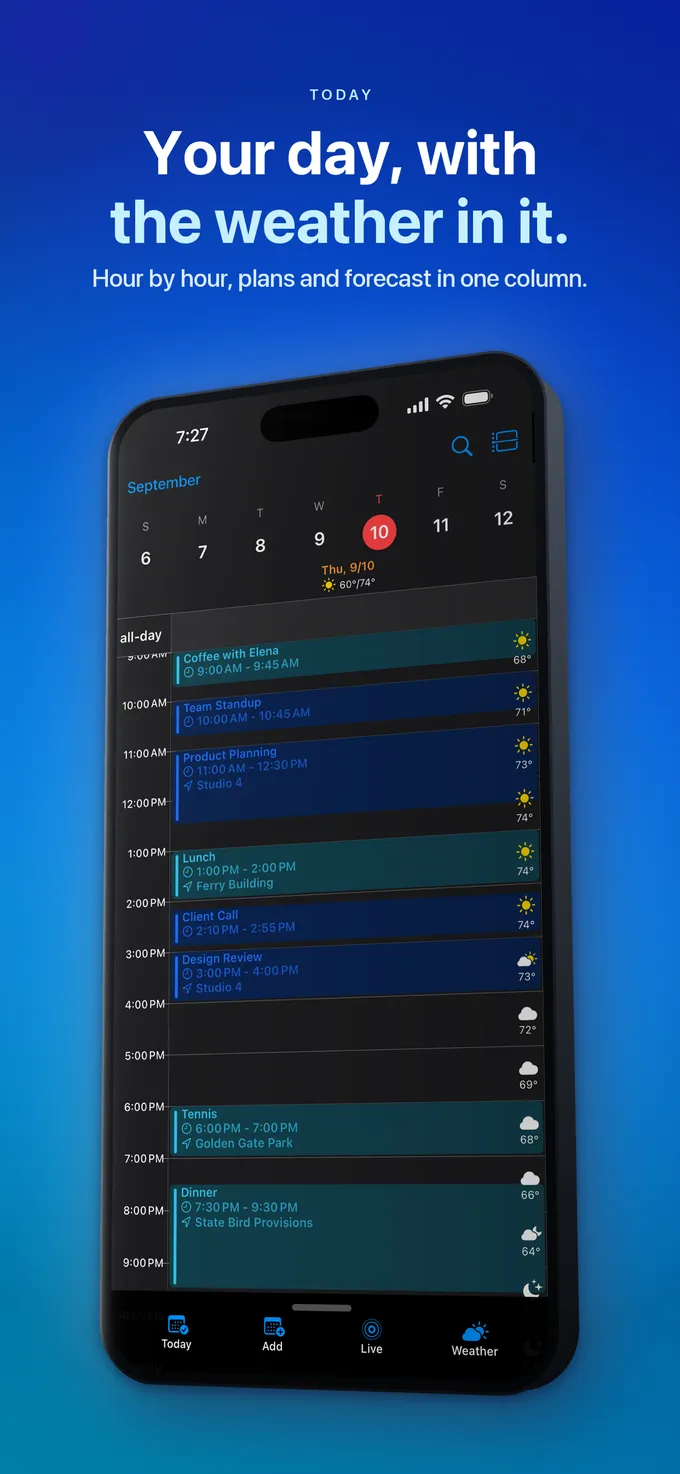




What to do
- Confirm the week and selected calendars.
- Identify agreed commitments and label provisional blocks.
- Include real travel, setup and handoff requirements.
- Agree the responsible person and confirm shared access.
- Check available weather information and an appropriate alternative.
- Verify saved destinations, alerts and repeat scope, then confirm changes.
Questions
- Must the review take exactly ten minutes?
- No. Use a short review as a starting habit. The needed time depends on missing information and the decisions involved.
- Does a time block reserve my availability everywhere?
- Do not assume that. Check the owning provider and the calendars used for scheduling; a personal combined view is not automatic availability copying.
- Does adding someone’s name assign the task?
- No. This workflow records an agreement. Confirm the responsibility and the person’s access separately.